This is the Linuxmuster.net archive. It is the place where you can get the latest versions of all Linuxmuster.net software.
This repo currently contains the following packages:
- leoclient2 (lmn71-testing)
- base7 (lmn71,lmn72,lmn73,lmn74)
- linbo-gui7 (lmn71,lmn72,lmn73,lmn74)
- linbo (lmn71, lmn71-testing,lmn72,lmn73,lmn74)
- linuxmuster-linuxclient (lmn71,lmn72,lmn73)
- linuxmuster-prepare (lmn71,lmn72,lmn73,lmn74)
- linuxmuster-webui (lmn71, lmn72,lmn73,lmn74)
- sophomorix (lmn72,lmn73,lmn74)
- linuxmuster-tools (lmn72,lmn73,lmn74)
- linuxmuster-cli (lmn72,lmn73,lmn74)
- linuxmuster-api (lmn72,lmn73,lmn74)
- linuxmuster-common (lmn73,lmn74)
- linuxmuster-fileserver (lmn73,lmn74)
To use the repository, please follow these steps:
wget -qO- "https://deb.linuxmuster.net/pub.gpg" | sudo gpg --dearmour -o /usr/share/keyrings/linuxmuster.net.gpgsudo sh -c 'echo "deb [arch=amd64 signed-by=/usr/share/keyrings/linuxmuster.net.gpg] https://deb.linuxmuster.net/ lmn74 main" > /etc/apt/sources.list.d/lmn74.list'sudo apt updateThis repository only serves the latest version of each package per distribution
(apt policy <package> lists a single version). If you really need an older version
(e.g. to roll back after a regression), every released .deb is attached to the
GitHub release of its project:
-
Open the releases page of the project (see the package list above), e.g. https://github.com/linuxmuster/linuxmuster-tools/releases
-
Pick the version you need, check that it was built for your distribution (most release titles show it, e.g.
Release 7.4.19 (lmn74)), and download the.deb:wget https://github.com/linuxmuster/linuxmuster-tools/releases/download/v7.4.19/linuxmuster-tools7_7.4.19_all.deb
-
Install it and keep apt from upgrading it again:
sudo apt install ./linuxmuster-tools7_7.4.19_all.deb
sudo apt-mark hold linuxmuster-tools7
-
Once the problem is fixed upstream, release the hold:
sudo apt-mark unhold linuxmuster-tools7 && sudo apt upgrade
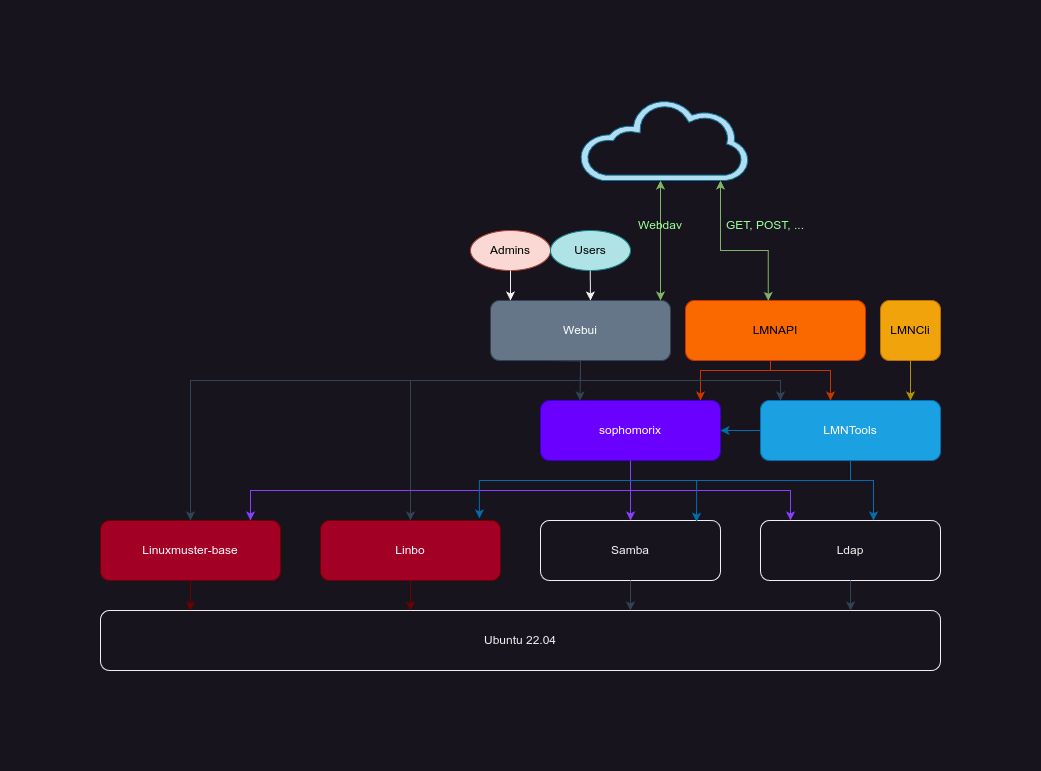
A quick view over the interaction between all packages when installed on the server: