







Chrome-like tab groups using private and isolated containers: The ultimate tab manager and groups for Firefox.

Latest unsigned builds from CI (To download builds from this site, please right-click and save to prevent errors when Firefox tries to "install" downloads.)


Tab Group = Container
Better than Chrome!
- Requires no setup before/after installation.
- Isolated cookies/logins for each of tab groups because they are containers.
- Per-window container management.
- Temporary containers and auto-cookie-discarding containers.
- Automatically sorts tabs based on containers.
- Manage tabs based on the domains of websites.
- Provides you with a menu where you can do the following actions:
- List all the tabs for a window.
- Show/hide tabs of a container.
- Create and delete containers as you like.
- Switch windows.
- Turns on First-Party Isolate (privacy.firstparty.isolate; FPI) with one click, from the help shown at installation or from the settings. It is off until you turn it on. FPI separates the cookies of different sites, even within the same container, by registrable domain. It also lets websites open new windows naturally and without flicker, unlike FPI simulated by switching containers. Tor Browser works the same way.
- Allows the user to enable fingerprinting resistance (privacy.resistFingerprinting).
- Per-container overrides of the language and the user agent settings.
- You can group containers.
- Each container appears as a Firefox tab group in the tab bar, with the container's name and color. This can be turned off in the settings.
The button to open the main controls is by default added at the tab bar at the top, as shown below. The button has three dots.

- Before starting a task, create a new container for it!
- Open tabs related to the task in that container.
- When finished, delete the container to remove all the clutters.
This extension is designed to be the best tab group extension/addon for Firefox.
This extension is intended to replace the following features/extensions:
- Conex, an extension which is not updated recently.
- Google Chrome's tab groups.
- View source (view-source: URLs) on No Container does not work. This is the limitation of WebExtensions API.
- Pages opening in "No Container" (the default container) start loading a little later than in containers, because the extension first checks whether another app opened them.
- Firefox Multi-Account Containers
- Facebook Container
- Temporary Containers
- Tab Session Manager
- Tree Style Tab (tested with 4.4.9 and containers shown as tab groups)
- Most extensions that changes the New Tab page.
Probably more compatible extensions...
- Simple Tab Groups (?)
- Some other tab management extensions, untested so far.
- Improve the compatibility with top 10 popular tab management extensions, for example
- Export the APIs to work nicely with Tree Style Tab
- Make this extension compatible with Simple Tab Groups, or make this extension feature-rich enough to unnecessitate Simple Tab Groups.
See ROADMAP.md for what 12.0.0 brings and what is left for later.
- English
- 日本語
- Français
- Esperanto
- Español
- Русский
- Deutsch
- Čeština
- Galego
- Interlingua
- 中文 (简体)
- Português (do Brasil)
This project uses Hosted Weblate for translation. You can contribute translations at Hosted Weblate.
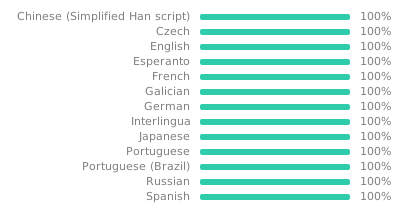


When translation is "closed for maintenance", please notify @metastable-void.
- metastable-void (ja, eo, ia)
- 佐々木Alex🐇 (Sasaki Alex🐇) (fr, es-ES, ru)
- TabArray is the code name, and Container Tab Groups is the user-facing name.
- The official extension ID is
tab-array@menhera.org. (Not an email address.) - To contact the developers, use Google Groups or GitHub discussions.
We use the following version scheme:
major.minor.maintenance.build
We make releases when first three version numbers change. The build version (fourth part) is purely informational.
For example, we just call 11.8.1.200 release 11.8.1.
Versions ending with .1xx are development versions, and versions ending with .2xx are release versions.
The two digits after 1 or 2 indicate patch level.
- Clone this repository.
- Install the latest Node.JS/NPM using NVM.
- In this directory, run
npm cito install the dependencies listed inpackage-lock.json. - Run
npm run buildto build the extension. Built extension's path is printed on console (usually under thebuilds/directory).
npm run build-for-amo is the same build. AMO's automated source rebuild uses this script name.
- Operating system: Linux, x86-64 or ARM64.
package-lock.jsonincludes the native packages of the build tools (rolldown, Lightning CSS, oxlint, oxfmt, TypeScript) for both. - Node.js: any version that
package.jsonaccepts (^20.19.0 || >=22.12.0), with the npm that comes with it. Node 24.14.0 with npm 11.9.0, AMO's default, and Node 26.13.0 with npm 11.20.0 produce byte-identical output on Linux x86-64. - Commands: in the extracted source, run
npm ci, thennpm run build-for-amo. The build itself needs no network access and no Git. - Output: the files of the extension in
dist/, and the package inbuilds/<version>/ctg-<version>-<commit time>-<commit>.xpi. - npm warnings: npm before 11.20 warns about the unknown
min-release-agesettings in.npmrc. They only delay new dependency releases when someone runsnpm install, and do not affectnpm cior the build. - The path of the source directory may contain spaces.
This project uses reproducible builds. This means built extensions from the same source are always the same.
To use this feature, make sure that:
- You build an extension either directly from a clean Git checkout (with Git installed), or from a source tarball made by
npm run package-source. - You install dependencies with
npm ci, so they matchpackage-lock.json.
npm run package-source writes builds/<version>/ctg-<version>-<commit time>-<commit>-source.tar.gz from HEAD and refuses to run with uncommitted changes. It works like cargo package: the tarball contains .menhera_vcs_info.json, which records the commit hash and the commit's date. Builds from the tarball read them from that file instead of Git, so they produce the same extension as a build from that commit. This is the source package to upload to AMO.
Since the hashes are the same, an extension you build from the official source passes Check for Official Build in the help view, which then shows a green checkmark next to the version. The button downloads this version's signature from downloads.menhera.org; nothing is downloaded until you click it.
When checking the integrity of package, certain files are ignored:
- Cryptographic signature files from Mozilla are ignored. (So that versions from addons.mozilla.org should show that they are "official.")
- The
manifest.jsonfile may be transformed by Mozilla, so only equivalence is checked.
This extension depends on many technologies not available in Chrome (only in Firefox), where the most important is Firefox's isolated containers feature. So it would not be possible.
See the issues. Something missing you need? Please file a new feature request there.
Copyright © 2026 Menhera.org contributors.
Licensed under GNU GPL version 3 or later.
- Icons and design tokens from Firefox (MPL-2.0): see
src/css/vendor/README.md
static/NOTICE, which ships in the extension, lists these files and their license.