Repository navigation
Mysql PDO heap corruption on Win10 x64 1909 (PHP x86 NTS) #9143
Description

Description
The following code:
<?php
define('DB_DRIVER', 'mysql');
define('DB_HOST', 'localhost');
define('DB_PORT', 3306);
define('DB_USER', '[removed]');
define('DB_PASS', '[removed]');
define('DB_NAME', '[removed]');
define('DB_DSN' , DB_DRIVER.':dbname='.DB_NAME.';host='.DB_HOST.';port='.DB_PORT);
$params = array(
  PDO::ATTR_ERRMODE => PDO::ERRMODE_EXCEPTION,
  PDO::ATTR_PERSISTENT => true,
  PDO::ATTR_EMULATE_PREPARES => false,
  PDO::MYSQL_ATTR_INIT_COMMAND => "SET SESSION sql_mode='', group_concat_max_len=32000, time_zone='+00:00'"
);
$params[PDO::ATTR_DEFAULT_FETCH_MODE] = PDO::FETCH_OBJ;
$handle = new PDO(DB_DSN, DB_USER, DB_PASS, $params);
Resulted in this output:
Random crashes with the following in Event Viewer:
Faulting application name: php-cgi.exe, version: 8.1.8.0, time stamp: 0x62c4c3bb
Faulting module name: ntdll.dll, version: 10.0.18362.719, time stamp: 0x832e7bce
Exception code: 0xc0000374
Fault offset: 0x000df95d
Faulting process id: 0x5458
Faulting application start time: 0x01d8a070256f66a2
Faulting application path: C:\Program Files (x86)\php81\php-cgi.exe
Faulting module path: C:\Windows\SYSTEM32\ntdll.dll
Report Id: a41ae7dc-55de-4152-b401-9553e23d1b5d
Faulting package full name:
Faulting package-relative application ID:
But I expected this output instead:
Successful database connection and no crashing.
Other notes:
This issue seems to be somewhat random, but I was able to get it to consistently crash if I kill the idle db connection via the sql command kill <id>;, then refresh the page. Using IIS 10 configured to hand-off the request to php via fastcgi. Database server attempting to connect to is on the same machine - Version: 10.4.12-MariaDB-log - Win10 x64. DebugDiag log attached (zipped due to file ext limitation on github).
php-cgi.exe_220725_131714_CrashHangAnalysis.zip
PHP Version
PHP 8.1.8 x86 NTS
Operating System
Windows 10 x64 1909
Activity
nerdspice commentedon Jul 25, 2022
Tested on PHP 8.0.21 under the same testing conditions and procedures - no crashes.
nerdspice commentedon Jul 25, 2022
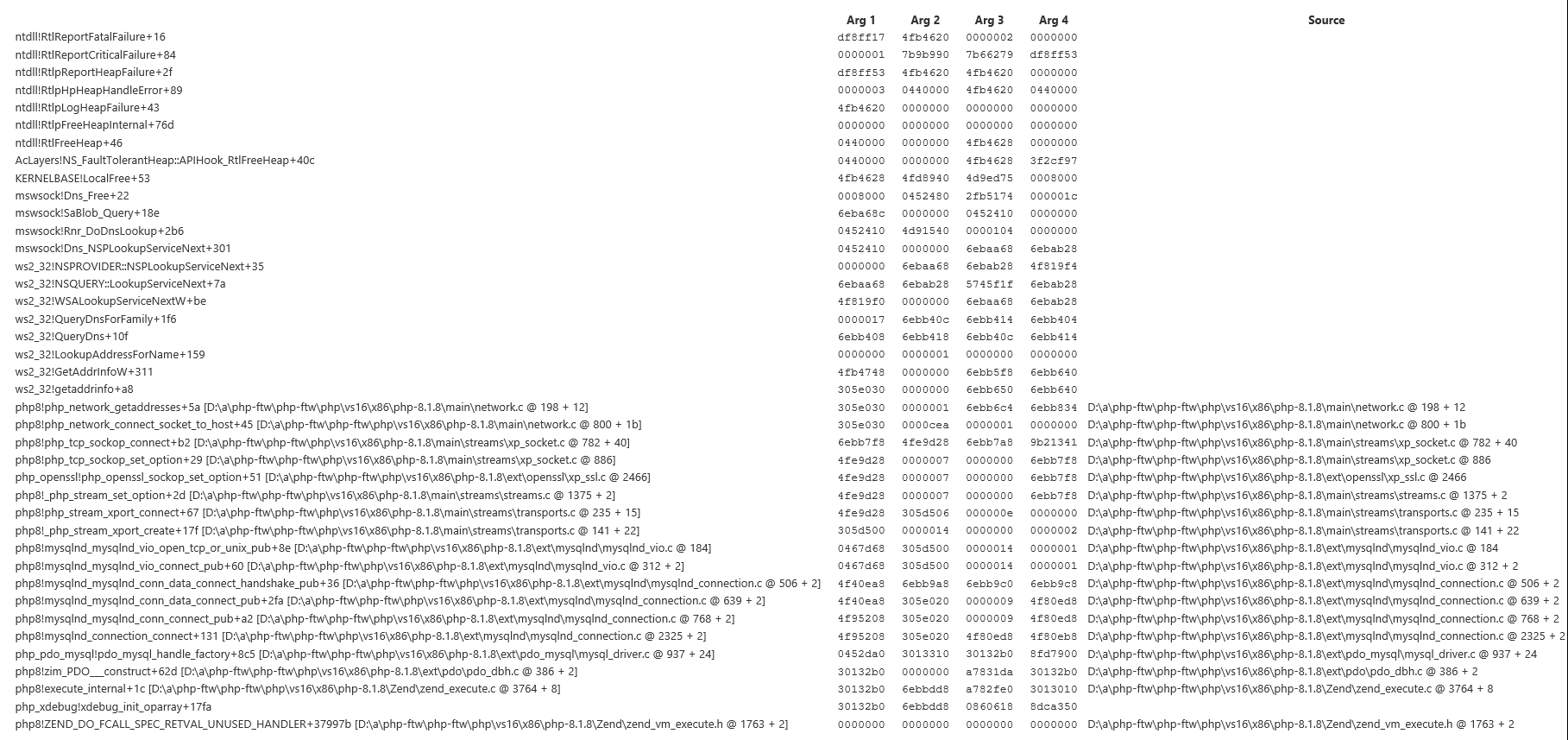
Pulled call stack from DebugDiag report:
cmb69 commentedon Jul 26, 2022
Hmm, I cannot reproduce this. A stack backtrace with debug symbols might be helpful.
nerdspice commentedon Jul 26, 2022
I followed the instructions for using Debug Diagnostic Tool since I don't have Visual Studio. That's what my previous screenshot was from: #9143 (comment)
Would a video help?
nerdspice commentedon Jul 26, 2022
Full screenshot from the DebugDiag report:
cmb69 commentedon Jul 26, 2022
Oh, right, I haven't noticed that debug symbols where installed. However, I still don't understand what might cause the segfault.
nerdspice commentedon Jul 27, 2022
I made a video showing the issue:
2022-07-26.21-53-46.mp4
nerdspice commentedon Jul 27, 2022
Testing with an incorrect user/pass/db_name also results in several random crashes if I refresh the page several times in a row.
nerdspice commentedon Jul 27, 2022
I'm not entirely sure what the issue is either, but if there's something I can try (change ini settings, or OS settings, etc), then let me know. Looking at the backtrace, it looks like it might be related to the DNS query for the db hostname.
nerdspice commentedon Jul 27, 2022
Trying with IP address 127.0.0.1 for the db host results in a crash, as well:
1 remaining item
nerdspice commentedon Jul 27, 2022
Well, this has been an interesting rabbit hole. Killing the persistent connection, then refreshing the page causes PDO to send a MySQL Ping command, assuming the persistent connection is still open, but the DB server simply resets the connection. That's when the crash happens.
gnufred commentedon Jul 27, 2022
Do you have the same problem if you connect to a DB that's running on another machine?
nerdspice commentedon Jul 27, 2022
Yes, tested
10.6.7-MariaDB-2ubuntu1.1 x64on a separate, remote server.I'm beginning to suspect some memory management issue with the first PDO connection when it tries to free its resources and setup the 2nd persistent connection. Does memory clean-up happen on a separate thread? That would explain why the backtraces aren't consistent and subsequent persistent connections can sometimes get interrupted upon crashing.
If I kill the persistent connection then quickly refresh the page fast enough (as I do in the video), that usually results in more consistent crashes. If I wait a while, maybe 5 seconds, between killing the persistent DB connection and refreshing the page, it usually doesn't crash.
Edit: I tested with a SSH tunnel to the remote server. The PDO hostname was still "localhost", but different port (the SSH tunnel port).
nerdspice commentedon Jul 27, 2022
Tested another physical DB server on my local network, this time without a SSH tunnel. PDO hostname was the IP address of said server. I still get the crash, but it was a little harder to do this time. The persistent connection doesn't always stick, either.
Edit: DB server version:
10.3.34-MariaDB-0ubuntu0.20.04.1 x64nerdspice commentedon Jul 27, 2022
Here's what the first successful connection looks like (192.168.255.200 is the DB server):
PHP is resetting the connection at the end and the connection doesn't persist (doesn't show in
show full processlist;).nerdspice commentedon Jul 27, 2022
PHP 8.1.8 x86 NTS on Win7 SP1 x64 also crashes, in CLI SAPI or FastCGI. Same PHP code.
nerdspice commentedon Jul 27, 2022
Sharing my php.ini file in case it might help for testing. I use xdebug version
php_xdebug-3.1.3-8.1-nts-vs16-x86php.ini.zip
cmb69 commentedon Jul 28, 2022
Does the segfault also happen with Xdebug and OPcache disabled?
nerdspice commentedon Jul 28, 2022
Yes
kamil-tekiela commentedon Nov 5, 2026
This was a heap overflow in mysqlnd on 32-bit builds with mysqlnd.collect_memory_statistics=On, fixed in PHP 8.1.13 by #9724. If that's not the case, and you still experience this issue with the recent PHP version, please open a new GH issue.