Repository navigation
Modernize the IDLE Find/Replace/Find in Files dialogs #67407
Description

| BPO | 23218 |
|---|---|
| Nosy | @rhettinger, @terryjreedy, @roseman |
| Files |

Note: these values reflect the state of the issue at the time it was migrated and might not reflect the current state.
Show more details
GitHub fields:
assignee = None
closed_at = None
created_at = <Date 2015-01-10.10:00:51.782>
labels = ['expert-IDLE', 'type-feature', '3.9']
title = 'Modernize the IDLE Find/Replace/Find in Files dialogs'
updated_at = <Date 2019-09-20.21:05:39.865>
user = 'https://bugs.python.org/AlSweigart'
bugs.python.org fields:
activity = <Date 2019-09-20.21:05:39.865>
actor = 'terry.reedy'
assignee = 'none'
closed = False
closed_date = None
closer = None
components = ['IDLE']
creation = <Date 2015-01-10.10:00:51.782>
creator = 'Al.Sweigart'
dependencies = []
files = ['37664', '37666', '37759', '37760', '40107', '40583']
hgrepos = []
issue_num = 23218
keywords = ['patch']
message_count = 7.0
messages = ['233812', '234230', '247893', '247906', '251623', '280129', '280227']
nosy_count = 4.0
nosy_names = ['rhettinger', 'terry.reedy', 'markroseman', 'Al.Sweigart']
pr_nums = []
priority = 'normal'
resolution = None
stage = 'patch review'
status = 'open'
superseder = None
type = 'enhancement'
url = 'https://bugs.python.org/issue23218'
versions = ['Python 3.9']
Activity
AlSweigart commentedon Jan 10, 2015
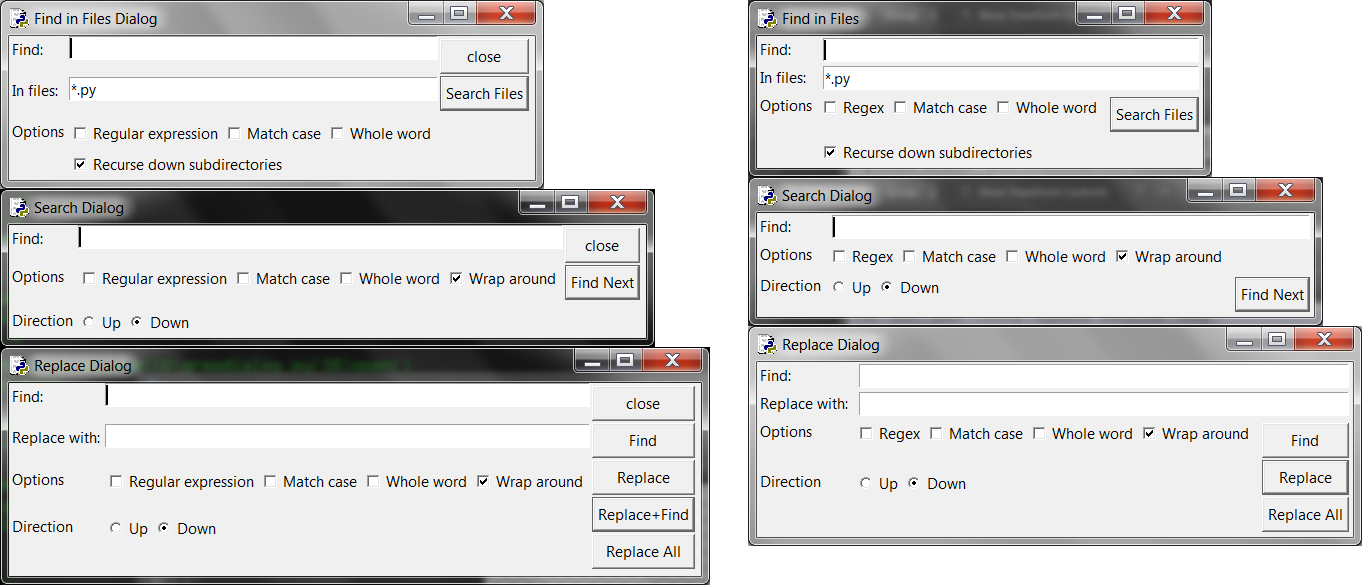
Various changes to modernize the user interface of the Find, Replace, and Find in Files dialogs:
The attached png shows the before/after differences in the design of these dialogs.
AlSweigart commentedon Jan 18, 2015
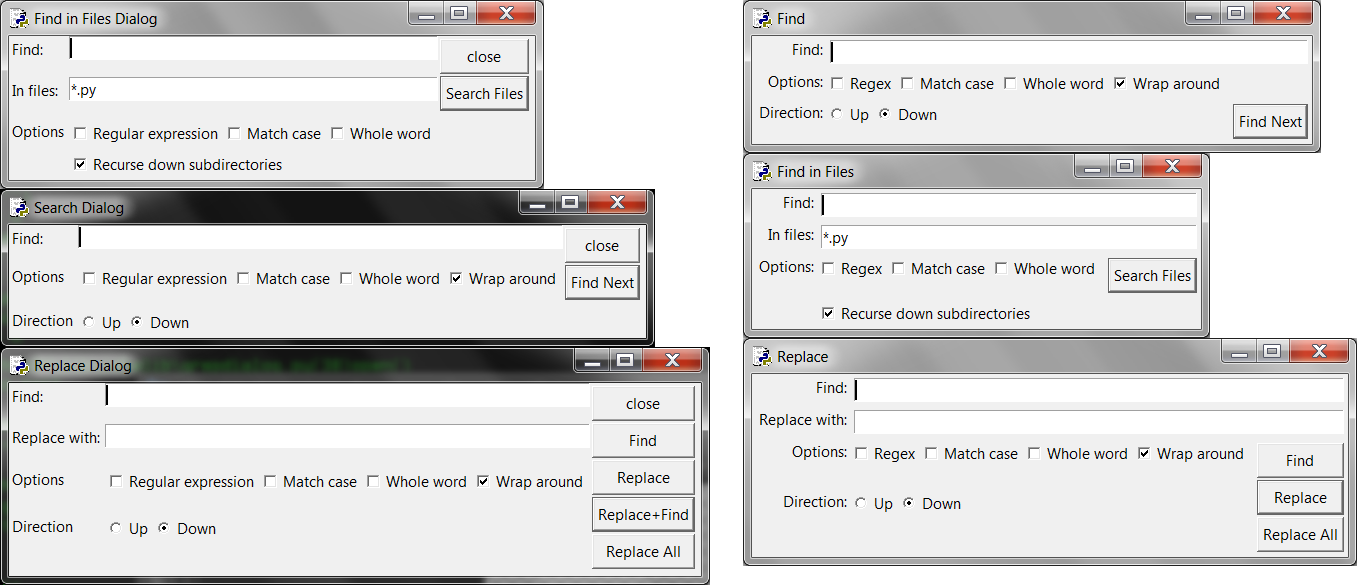
I've made some minor updates: Adding colons to the labels and right-justifying them. These updates can be seen in the second comparison screenshot.
roseman commentedon Aug 2, 2015
For illustration, attached idle_find_ttk.png, which is a minor layout tweak of the existing one (works on all the various find dialogs, though not shown in screen shot). I agree with Al's other suggestions here.
rhettinger commentedon Aug 2, 2015
These changes all seem reasonable and have a nice look.
I have misgivings about shortening "regular expression" to "regex".
Otherwise, +1 for everything else.
roseman commentedon Sep 25, 2015
Have attached find-dialogs.patch, which does some cosmetic tweaks to the existing dialogs, as per the previous screenshot. It uses ttk widgets if available, and standard Tk widgets if not.
Relies on the ui.py module (not attached, as it is changing often).
AlSweigart commentedon Nov 6, 2016
*Bump* Just wanted to bring attention to this issue. We could keep "Regular expression" instead of "Regex" for the label (Sublime Text and other editors have "Regular expression")
I think Mark's patch would be better over mine.
terryjreedy commentedon Nov 7, 2016
Al, thanks for the honest comparison.
For 3.6, we can just import and use ttk with no fuss.
When I get to this, I will review tests and responses to <Return> and <Escape> (see bpo-27621).
terryjreedy commentedon Dec 27, 2023
#57795 (comment)
Put
[ Close ](cap 'C'0 at bottom. [Notepad++ has this.]Change
[ Find ]to[ Find next ]. [ditto]terryjreedy commentedon Oct 21, 2026
Further changes inspired by Notepad++, for a new issue with more than 1 PR.
Change grid from 2 columns to three.
2a. Move
[_] Regular expressiondown to its own line as, properly aligned,Search mode: [_] Regular expression.2b. Replace direction radiobutton with checkbutton at the end ol the line above:
[_] Search up.